
Free · Windows 10 and 11, 64-bit
Download TLI Toolkit for Torchlight: Infinite
A free TLI tracker for loot, profit and FE per hour, with Vorax and Tartarus solvers and an overlay. One portable .exe, nothing to install. The only official place to get it is the GitHub releases page of SheF1k/tli-toolkit-releases; the button below downloads it from there. Copies anywhere else aren’t ours.
TLI Toolkit is a Windows PC app: open tlitoolkit.com on your PC to download it. The guides and strategies work on any screen.
Works with today’s patch: Partly works: Vorax screen reading, Tartarus screen reading · the rest checked with SS14 Tartarus, 8 Nov 2026 Status →Latest test build (beta)
TLI Toolkit 0.1.0-beta.79
Published 21 Nov 2026 · TLI-Toolkit-0.1.0-beta.79.exe · 142 MB · Windows 10 and 11, 64-bit · free
Run and price sharing uses one switch. Minigame sharing uses another. Both are on by default in Settings → Community. Diagnostics is on by default. Private replay sharing is also on by default. Replays can include game images. Turn diagnostics and replay sharing off in Diagnostics (main menu). If you opted out before beta.51 and local retention and diagnostics were on, the update turned replay sharing on once. Turn it off again in Diagnostics. What the app reads and sends
- Reads the game’s own log file
- Screen reading uses the game window, or its monitor cropped locally to the game area
- Never reads or changes game memory; injects nothing
- Never clicks or types for you: every move is yours
- No admin rights: one portable .exe
- Every release lists its SHA-256
An unofficial fan tool: use it at your own risk. What it reads and what goes online
What’s new in 0.1.0-beta.79
- Vorax clears card positions when the board changes.
- The Erika 1 Thunder Spike build guide is now available in Korean.
- The Erika 1 Thunder Spike build guide is now available in Russian.
- The Erika 1 Thunder Spike build guide is now available in Simplified Chinese.
SHA-256 of TLI-Toolkit-0.1.0-beta.79.exe
85a67d5007127b5e7d5e242b2e64d1763c6f2944cd05e0c338ad7fe194966b2cEvery version so far is a test build, marked as a pre-release on GitHub. Please report anything odd (in the app: Ctrl+Alt+B). Older versions: all releases.
First start: “Windows protected your PC”
- Run the .exe. The app isn’t code-signed yet (signing is planned; until then, check the hash above), so Windows SmartScreen may say “Windows protected your PC”: click More info, then Run anyway. Some antivirus tools are wary of new unsigned programs too; see the FAQ.
A simplified drawing of the warning. “Unknown publisher” means the .exe isn’t code-signed yet, not that something is wrong with it; the SHA-256 check below proves your file is the one that was published. - In the game: Esc → Settings → Other → Account Related → press the Enable Log button. The game turns logging off at every start, so press it again after each launch.
- Relog (character select and back in), and sort your bag once, so the tracker knows your character and everything you carry.
- The app finds the log by itself. The top bar says Game log connected once it’s being read, and the Get tracking card ticks off Game logging is on once Enable Log worked; if the app can’t find the log, pick the file in Settings.
Check your download (optional, 30 seconds)
Every release lists the SHA-256 of its .exe. If your file has the same hash, it is exactly the file that was published. Open PowerShell in the folder where you saved it (Windows 11: right-click an empty spot → Open in Terminal; Windows 10: Shift + right-click → Open PowerShell window here) and run:
Get-FileHash .\TLI-Toolkit-0.1.0-beta.79.exeCompare the Hash it prints with the one above (letter case doesn’t matter). Or let PowerShell compare for you; it prints True when they match:
(Get-FileHash .\TLI-Toolkit-0.1.0-beta.79.exe).Hash -eq '85a67d5007127b5e7d5e242b2e64d1763c6f2944cd05e0c338ad7fe194966b2c'System requirements
- Windows 10 or 11, 64-bit (x64). Not for macOS, Linux or Steam Deck.
- About 142 MB for the portable .exe; nothing to install.
- Torchlight: Infinite (Steam, the standalone launcher or TapTap), with Enable Log pressed in game after each launch.
- Internet for prices and update checks; offline, the tracker keeps going with the last prices it fetched.
- The app speaks English, 简体中文, 한국어 and Русский (Settings → Language). The tracker works from the game log. Offline screen-reading models are bundled for English, Simplified and Traditional Chinese, Korean and Russian. Chinese and Korean recognition accuracy is still being checked; review uncertain readings.
Screenshots
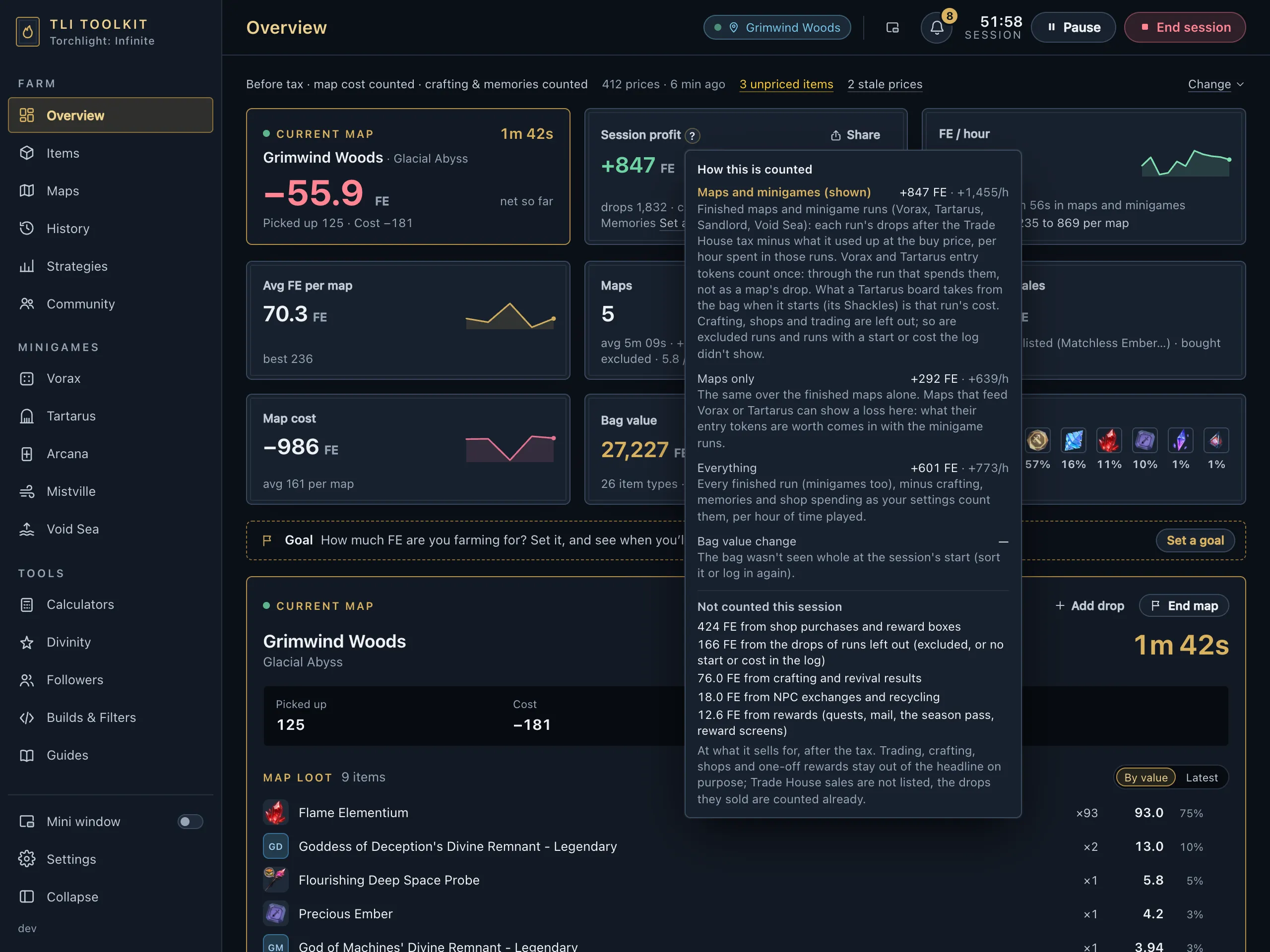
The app with sample data, not a real session. Click a picture for the full size.




Updates
When a new version is out the app tells you. Update and restart downloads it from the same GitHub releases page, refuses it unless its SHA-256 matches the one published with the release, swaps it in, and keeps the old .exe until the new one has started. Settings → Updates has a Stable and a Beta channel. You can always download a new version by hand instead.