
Guide

FE tracker
The TLI tracker reads your game log to count loot and map costs. Its FE tracker shows net profit per hour using either total elapsed time or time spent in maps.
Reconcile your first complete run ↓
Also called: loot tracker
loot tracker, profit tracker, FE/h, farming tracker
Last checked against SS14 Tartarus · 8 min read · updated
On this page
Reconcile your first complete run
- Start tracking before opening a map; keep price, tax and time settings fixed.
- Compare entry items and collected drops after returning to town.
- Restart the comparison with a complete run if the opening cost is missing.
Synthetic worked example
Worked assumptions and full explanation
Before opening a map, start tracking and check the price source, after-tax setting, buying premium and time basis. Keep these settings unchanged while comparing runs. A manual item price can help with an unpriced drop, but it is your valuation, not a confirmed sale.
Open one map, finish it, return to town and inspect its run detail. Compare the consumed items with what the map device used, then compare the drops with the items you actually collected. A log that begins inside the map cannot prove the missing opening cost. Do not infer that a zero entry cost means a free map.
Synthetic reconciliation, 2026-11-15: suppose a run has 100 FE in direct currency, an item valued at 80 FE before tax, and 20 FE of recorded entry cost including your chosen premium. With after-tax valuation, the item contributes 70 FE and valued profit is 150 FE. If the entry is missing, the apparent 170 FE overstates profit by 20 FE. If the item has no price, a provisional 80 FE manual valuation repairs the estimate, not the historical cash receipt.
Use the complete run as your check case. If the opening was missed, begin the next map with tracking already active and compare that complete record. Keep incomplete runs identifiable and outside the comparison where appropriate; a lost map still represents spending. Saved run prices and a current item price are different things, so recheck the affected run rather than assuming a price edit rewrites history.
On a 10-minute time basis, the 150 FE valued profit in this example gives 900 FE/hour. The 170 FE shown without entry cost would read as 1,020 FE/hour on the same clock. Check the recorded entry before crediting the higher rate to the farm.
The short answer
An FE tracker reads what the game writes about your session and turns it into one number. TLI Toolkit’s is built so that you can see every rule behind that number: it prices drops and what each map cost from the same feed, takes off the Trade House tax only where you would pay it, and divides by real time or by time in the map, your choice. It reads the game log, so nothing is typed in and the game isn’t touched.
What it counts
| Counted | How it knows | Valued at |
|---|---|---|
| Every item you pick up in a map or a minigame | The game log’s pickup lines for the run | The price feed, minus the Trade House tax when “After tax” is on (Flame Elementium is never taxed) |
| What opening a map took (beacon, compasses, probes, Resonance) | The items the map device takes from your bag | The feed’s price plus a buying premium (below) |
| What you buy and sell on the Trade House | The log’s exchange lines | What you really paid; listings you make are kept out of loot |
| Time | The log’s timestamps | Session time, with gaps over 5 minutes left out |
In our own check (2026-11-11) of about four hours of the maintainers’ play, 71 runs, every positive bag change inside a run was also counted by the tracker: no pickup missed, none counted twice. What the bag can’t show, the log can’t either: loot hidden by your own loot filter, for one.
What it leaves out or only flags
- Trade House receipts and listings are never loot: an item you put up for sale leaves your bag but isn’t a loss, and a sale isn’t a drop.
- Hero Memories (Memory of Origin, Discipline and Progress) have a rolled value, so a feed price would mislead: the app counts them but leaves them unpriced until you set a price yourself. About 1 map in 8 of ours dropped one, so a farm that finds them is undervalued until you do. unconfirmed
- Vendor purchases and reward boxes (Flame Sand for Elixirs, Winding Keys) aren’t a run’s cost: they are about 1% of bag movement in our check, but a big Flame Sand purchase is real spending the tracker doesn’t attribute yet.
- Short runs. A map shorter than 40 seconds (opened by mistake, re-entered) still counts in your totals, since a map paid for and abandoned is a loss, but stays out of per-hour figures. Rates need a run of at least a minute.
- Maps with no cost. If the log starts inside a map, or you open the app mid-session, that map has a drop value and no cost, which flatters it by about the price of one map. About 1 map in 20 of ours.
FE per hour: real time or in map
In map divides a run’s profit by the time you spent inside it. Real time adds the time between runs: town, selling, the minigames’ boards, crafting. In our two long logs 28% to 42% of active time was outside any run, so the two numbers differ a lot. Use real time to compare with what you earn, in map to compare two setups.
- A gap of more than 5 minutes with no game activity ends active time (the clock also stops when you press Pause).
- Each run gets its own FE per hour. The app shows the median and the middle half next to the mean, and a trend: the rolling median of your last 20 runs, once you have 5.
- Minigame boards read in the hideout count as town time unless a run starts right after, so a Vorax or Tartarus FE per hour is a little flattered. unconfirmed
Prices, the buying premium and the tax
TLI Toolkit’s price service uses Trade House searches shared by TLI Toolkit and TITrack players. The service selects a source per item using its age and supporting player count. The price list shows the source, date and available player count. Your own prices and Trade House searches take priority over public prices in the app; stale prices are marked.
Our 2026-11-11 accuracy check used the tlicompanion feed before its public API closed. That feed took the median of each player’s latest price over 7 days, with at least 3 players. In that dated sample the median price age was 11 hours and 37% of items were older than a day. This is the historical check’s basis, not a three-player minimum for every current price source.
- The buying premium (+4.5%). What a map takes costs what it takes to buy again, and real purchases ran 4.9% and 3.4% above the feed in two logs of ours. You can switch it off or change it.
- The tax (12.5%). The Trade House takes 12.5% (1 in 8), confirmed in game. The log never writes the tax itself. The FE farming guide has the details.
- Saved runs keep the prices they were locked at, so a run doesn’t change when the market does.
Jackpots and how to read the number
Drops are lumpy. In 57 maps we replayed, the top 10% held about 27% of all the value, and one drop was over half of a single map’s value. A mean follows the jackpot; the median doesn’t. So:
- Look at the median map and the middle half before the total.
- Leave an outlier out of every stat (the app can) and compare the two numbers: if they differ a lot, you were lucky or you were not.
- Judge a farm after 50 maps or more, run the same way. How the community tables do it.
- Remember the cost side: on a typical Deep Space map in our logs the compasses cost more than the drops were worth, and the profit came from the minigames the maps fed. The Deep Space guide counts it as one loop.
Sources
Mechanics and reference
| Source | Used for |
|---|---|
| The tracker’s own rules (TLI Toolkit 0.1.0-beta.27) | What is counted, the 40-second and 1-minute limits, the 5-minute break, the median and trend, the premium |
| Our accuracy check, 2026-11-11: three game logs replayed, 71 runs, 2.47 million log lines | Bag against tracker, share of time outside runs, jackpot share, price age, the buying premium |
| TLI Toolkit’s current price list | Current per-item source, price date and supporting player count when available |
| tlicompanion price feed, 2026-11-11 accuracy check | Historical prices and the feed’s median and three-player rule |
| TapTap developer blog #25, 2022-12-17 | The Trade House tax as first described (preliminary) |
If the figures do not reconcile
| Symptom | Check and action |
|---|---|
| Drops appear but entry cost is zero | Check whether tracking began after opening. Use a fully observed next run to diagnose collection; do not invent a cost event. |
| An item has no price | Inspect its source and item identity. Set a defensible manual valuation if needed; keep uncertain rolled-item value separate. |
| FE per hour differs between screens | Match time basis, selected runs, exclusions and tax settings before comparing. |
| The number changed after a price edit | Check whether you are viewing current inventory or locked run prices. Treat the two valuation dates explicitly. |
Next, reconcile the whole farming batch with the same settings. The tracker estimates loot value; Trade House proceeds establish what actually sold.
How TLI Toolkit helps
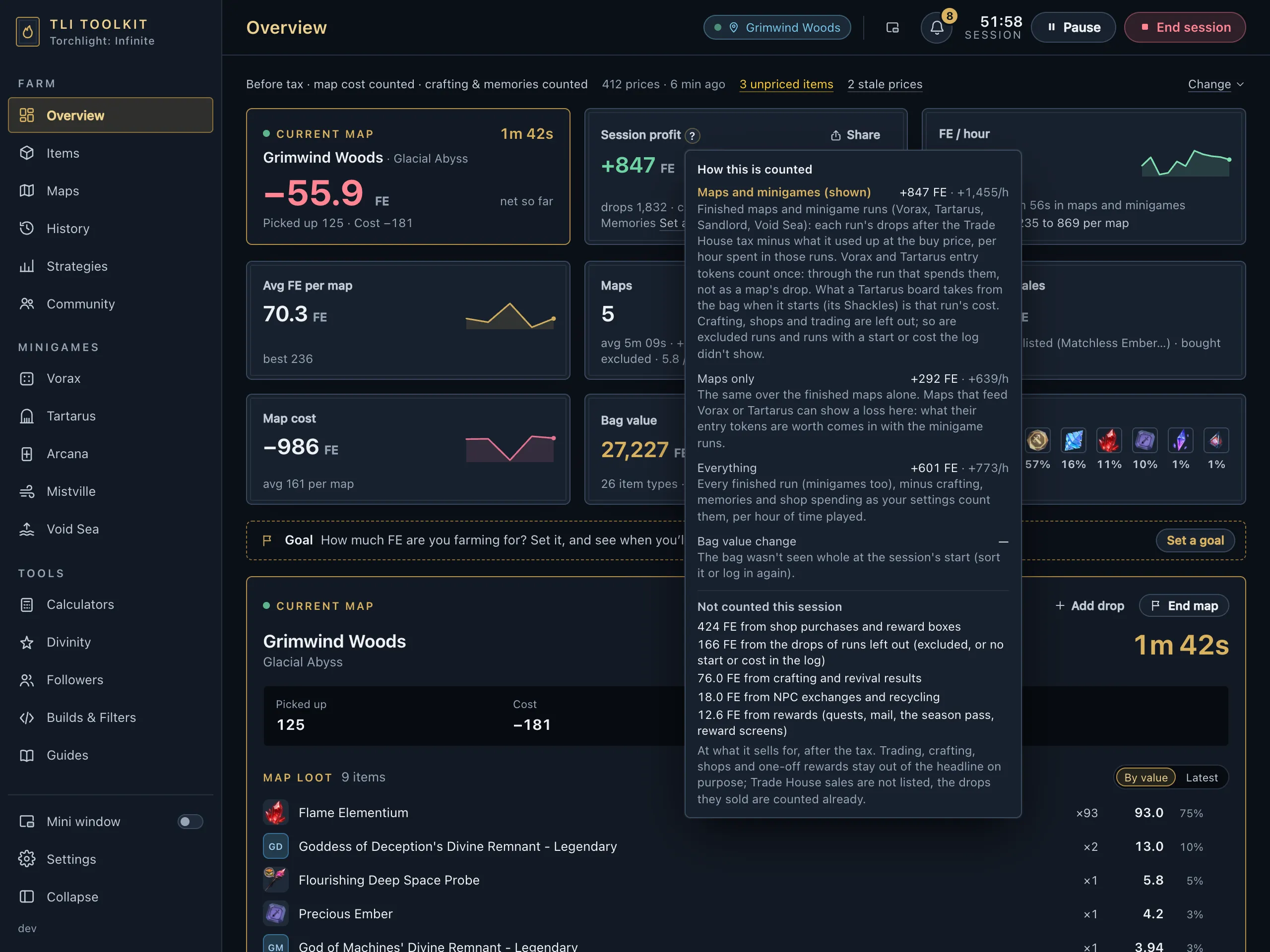
How this is counted — enlarged sample
- Overview shows bag value, session profit and FE per hour; Maps shows each map type’s runs, profit, time and rate; History shows the median, the middle half and your best drops.
- Every switch above (After tax, the buying premium, real time or in map, leaving a run out) is on the page, and a price you set yourself wins over the feed.
- The mini window keeps the rate in front of you while you play. What the app reads from the game.
Free for Windows 10 and 11: download TLI Toolkit.
Items in this guide


Try it in the app
It’s part of TLI Toolkit, free for Windows 10 and 11.
FreeWindows 10/11, no installWhat’s new
TLI Toolkit is a Windows PC app: open tlitoolkit.com on your PC to download it. The guides and strategies work on any screen.
Written from the game’s own texts, patch notes and community research. Mechanics change between seasons; if something here is out of date, tell us on GitHub.